Seated Shows
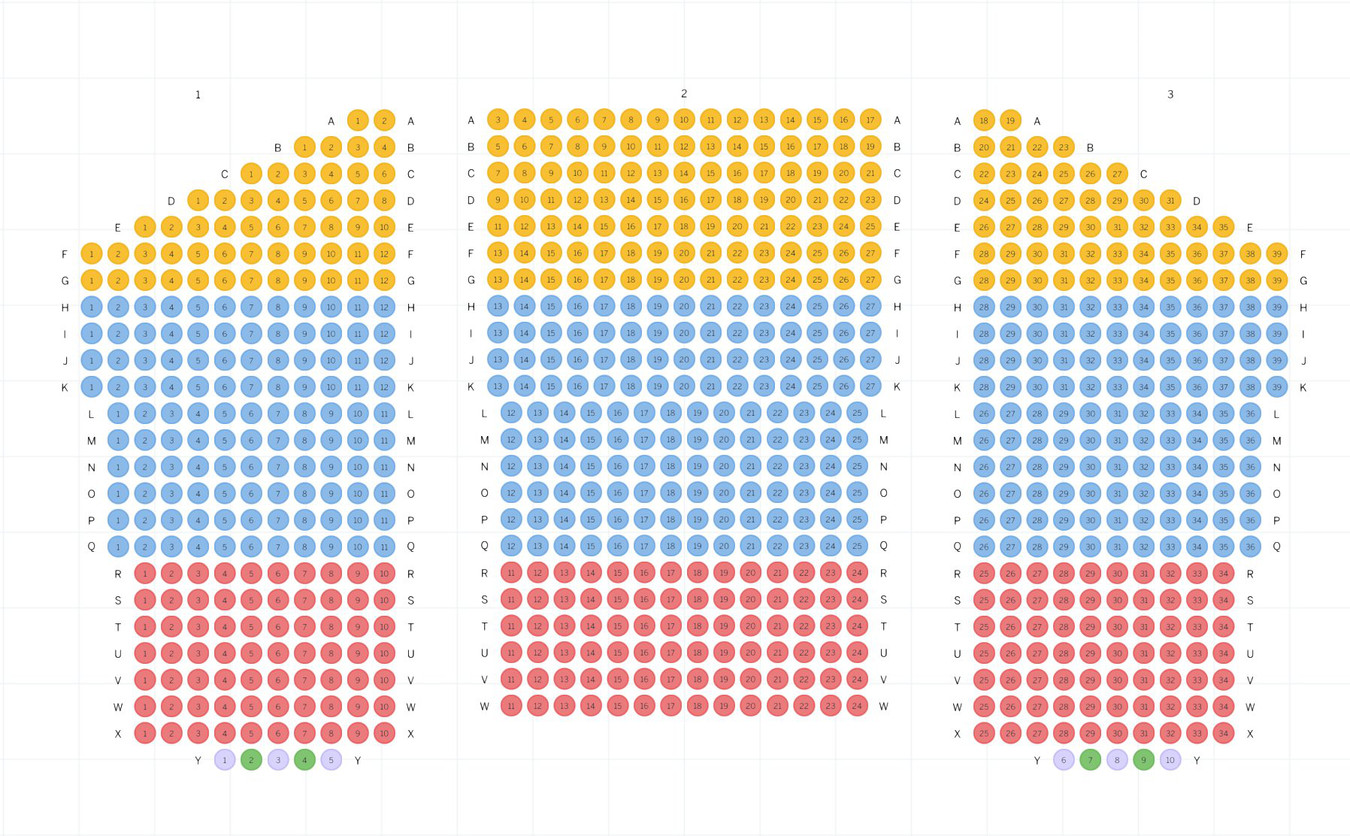
Molded Stacking Seats: the first eleven rows of seats are molded stacking chairs. (Rows A-K)
Padded Theater Seats: the remaining rows of seats are padded theater seats.
Wheelchair & Companion Seats: There are two wheelchair spaces & three companion seats per section. Located in row Y, sections 1 and 3.
Download Handicap Parking Map for Downtown SLO.
Price Tier Information
For seated shows, the seating chart is divided into tiers based on pricing. Price Tiers for seated shows vary by show.
"Price Level One" Tier: P1 seats are the most premiere seats in the venue. Located in the front-most area, closest to the stage. Typically, P1 seats are molded stacking chairs.
"Price Level Two" Tier: P2 seats are the next section back, after P1 seats. Exact rows vary by show.
"Price Level Three" Tier: For shows that feature third price tier, these seats are typically located behind the P2 section.
Choosing your seats during ticket purchase
Please follow the below directions to choose your preferred seats when purchasing tickets online on the Eventbrite Ticketing Platform:
- Click the "Tickets" link for any event on the Shows page.
If your event is using Eventbrite:
- Select your Price Level of choice and use the dropdown menu to select the correct quantity of tickets you want to purchase.
- Click the green "View on Map" button.
- Important: Eventbrite will automatically select seats for you. To select preferred seats, you must "de-select" what Eventbrite has auto-selected, and "re-select" seats in your preferred location.
- Click the green "Checkout" button.
- Review your Order Summary.
- Enter your Registration Information.
- Click the green "Pay Now" button.
If your event is using a different ticket provider, there may be a similar process to select preferred seats.
- You will receive a confirmation email to the e-mail address you used to make your order.
- Please reference this seating chart to locate your seats.